

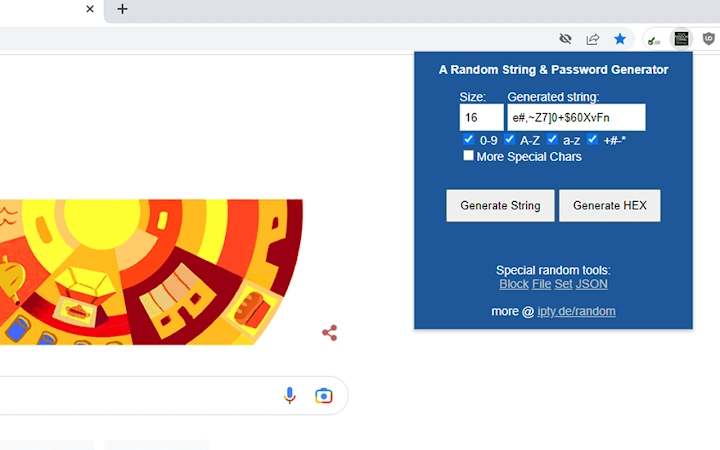
Description
One-Click Random String Generator for Secure Passwords
Overview
The software is a lightweight, fast, and privacy-focused tool designed for generating random strings and numbers with a single click. It is particularly useful for creating secure passwords, temporary codes, or unique identifiers. The tool allows users to customize the length and character set, including letters, numbers, and special characters, making it ideal for scenarios requiring high entropy and unpredictability. It operates entirely within the user’s environment without background processes, ensuring no data is collected or transmitted. This makes it suitable for privacy-conscious individuals, developers, and IT professionals who prioritize data security and minimal footprint. The application is designed for straightforward use, targeting users who need quick, reliable randomness without complex configurations. It runs on multiple platforms, including Windows, Mac, and Linux, offering broad accessibility. While the developer did not provide additional system requirements, the small file size suggests low resource demands. The software is free to use, with no licensing restrictions, and is appropriate for both personal and professional use cases where secure, on-demand randomness is essential.
Key Features & Capabilities
- One-Click Generation – Produces random strings instantly with a single user action, minimizing interaction time and streamlining workflows.
- Customizable Length – Users can define the desired length of the generated string, with a default set to 16 characters in the latest version.
- Flexible Character Sets – Supports selection of letters (uppercase and lowercase), numbers, and special characters, with an extended option available for broader character coverage.
- Privacy-First Design – Operates without background execution and does not collect, store, or transmit any user data, ensuring full privacy.
- Performance Optimized – Built with pure JavaScript, eliminating external dependencies like jQuery, resulting in faster startup and reduced memory usage.
- Enhanced Randomness – Implements multiple randomness improvements, including options to avoid direct duplicates and integrate remote entropy from trusted sources.
These features make the tool highly effective for password creation, session token generation, or any use case requiring secure, unpredictable sequences. For example, a developer can generate secure API keys in seconds, while a personal user can create strong passwords for online accounts without relying on third-party services. The absence of external dependencies and the use of remote entropy sources enhance the unpredictability of outputs, which is critical for security-sensitive applications. The tool’s simplicity ensures that even non-technical users can benefit from advanced cryptographic principles without understanding the underlying mechanics.
User Interface, Workflow & Performance
The user interface is minimalistic and focused on core functionality, featuring a clean layout with a prominent generate button and input fields for customizing string length and character preferences. Navigation is intuitive, requiring only a few clicks to configure settings and produce output. The workflow is streamlined: users adjust options, click once, and receive a result—ideal for rapid iteration. The software is designed for immediate use, with no setup steps or configuration menus. Performance observations are based on general software behavior patterns, as exact resource usage details were not specified. However, the application’s lightweight nature and use of pure JavaScript suggest efficient CPU and RAM utilization. Stability appears high, given the consistent updates focused on bug fixes and performance improvements. No background processes are active, reducing system load and preventing interference with other applications. The developer did not specify resource usage details, but the 1.5 MB file size indicates a compact footprint, suitable for older or low-resource systems.
Compatibility & System Requirements
The software is compatible with Windows, Mac, and Linux operating systems, ensuring broad accessibility across desktop environments. It is available in version 1.0.19 and has a file size of 1.5 MB, indicating a compact installation. The developer did not provide additional system requirements, so users should expect minimal hardware demands. No specific CPU, RAM, or storage thresholds were listed, but the small size and lightweight architecture suggest compatibility with older systems and low-end hardware. The software is designed to run natively on the target platforms without requiring external runtime environments or framework installations. Platform compatibility information is limited to the provided list, and no details were given about compatibility with virtual machines or containerized environments. Users should verify functionality on their specific setup, especially in restricted or enterprise environments where software execution policies may apply.
Pros and Cons
Pros
- Extremely fast and simple one-click operation
- Privacy-focused with no data collection or background activity
- Customizable string length and character sets
- Open-source and free to use
- Lightweight at only 1.5 MB
- Regular updates with performance and security improvements
Cons
- No advanced features like password vault or history tracking
- Interface is minimal and may lack visual feedback for some users
- No built-in export or clipboard integration mentioned
- Limited documentation or user guides available
- Not suitable for bulk generation or automated workflows
FAQ Section
Is the software available for Windows, Mac, and Linux?
Yes, the software is compatible with Windows, Mac, and Linux operating systems, offering cross-platform support for desktop users.
Does the tool collect or send user data?
No, the software does not run in the background and does not collect, store, or transmit any user data. It is designed with privacy as a core principle.
Can I use this tool offline?
Yes, the software operates entirely offline and does not require an internet connection for basic functionality. Remote entropy sources are optional and not mandatory.
How often is the software updated?
Updates are released regularly, with version 1.0.19 published on April 15, 2024. Recent changes include performance optimizations and enhanced randomness.
Is the software free to use?
Yes, the software is completely free to download and use, with no licensing fees or hidden costs.
Final Thoughts + CTA
With its emphasis on speed, simplicity, and privacy, this one-click random string generator delivers a reliable solution for users seeking secure, on-demand randomness. Its minimal interface, lack of background processes, and commitment to data protection make it a standout choice among utility tools. While it lacks advanced features like password storage or automation, its focused design ensures it excels at its primary purpose: generating secure strings quickly and safely. The tool is especially beneficial for developers, IT professionals, and privacy advocates who need a trustworthy, lightweight utility. The regular updates and open-source nature further enhance its credibility. For anyone requiring a secure, no-frills random generator, this software is a top-tier option. Download One-Click Random String Generator for Secure Passwords now.
Guides & Tutorials for Random String & Password Generator Extension for Chrome
How to install Random String & Password Generator Extension for Chrome
- Click the Preview / Download button above.
- Once redirected, accept the terms and click Install.
- Wait for the Random String & Password Generator Extension for Chrome download to finish on your device.
How to use Random String & Password Generator Extension for Chrome
This software is primarily used for its core features described above. Open the app after installation to explore its capabilities.
User Reviews for Random String & Password Generator Extension for Chrome 0
No reviews found





